
One platform for every dollar—budget to invoice.
BuiltTrack unifies Work Breakdown Structure (WBS), Organizational Breakdown Structure (OBS), and Cost Breakdown Structure (CBS) planning, budget creation, contract management and procurement, multi-step invoice approvals, cost forecasting, and risk management into one consolidated, controlled environment — built specifically for construction projects.
Who We Serve
Purpose-built for capital construction teams.
BuiltTrack is built for the owner side of capital construction — the teams accountable for budgets, procurement, approvals, and project outcomes.
Project Owners
Control capital project outcomes with trusted oversight.
Real Estate Developers
Manage your entire portfolio with confidence.
Project Management Consultant
Run professional projects from a single platform.
Owner's Representative
Streamline reporting and keep every project on track.
Sectors served
Platform capabilities
Everything a capital project needs — in one system.
BuiltTrack connects your planning, procurement, contracts, and payments so nothing slips between tools.
WBS budget planning with ATS approval
Build a multi-level WBS with ROM estimates and CSI cost codes, then submit scope for CFO Authorization to Spend — including partial approvals by row.
Bid packages & contractor selection
Scope bid packages to WBS rows, attach a Statement of Work, and invite contractors by email. Compare bids with built-in bid leveling before award.
Invoice approvals with a multi-step chain
Each invoice moves through a controlled approval chain — Project Manager, then Project Controls, then CFO — before payment is released. Any reviewer can reject with a comment.
Contract management with change orders
Track contract commitments, progress, and retainage in one place. Log and approve change orders, with real-time updates to the revised contract value.
Live EAC / ETC cost forecasting
Estimate at Completion and Estimate to Complete are calculated automatically from approved budgets, change orders, and invoice payments already in the system — no month-end spreadsheet.
PCO & RFI tracking through resolution
Track Potential Change Orders and RFIs from open to resolved, converting approved PCOs directly into Change Orders with full discussion history.
Analytics and exportable reports
Five analytics views — Budget, Bidding/RFP, Contracts, Invoices, and PCO & Change Orders — with charts and one-click export to Excel or PDF.
Risk register linked to your WBS
Every risk is tied to an RBS category and the WBS line item it threatens, scored with an industry-standard 5×5 probability/impact matrix and banded Low / Medium / High / Critical.
Integrated modules
Budget to risk, one system
Invoice approvals
PM → Controls → CFO
Analytics views
Excel & PDF export
Sectors served
Capital construction
How it works
One continuous flow, budget to forecast.
Each stage of the capital project lifecycle feeds the next in the same controlled environment — budgets flow into contracts, contracts into invoice approvals, and every approval updates the forecast automatically. No re-keying, no disconnected tools.
Budget
Plan a multi-level WBS, assign ROM estimates and CSI cost codes, and submit scope for CFO Authorization to Spend (ATS).
Contracts
Scope bid packages to WBS rows, invite contractors, level bids, and award into contracts committed against the budget.
Approvals
Each invoice moves through PM → Project Controls → CFO. Payment is released only after CFO approval.
Forecast
Live EAC and ETC update automatically as change orders and invoices are approved, alongside the risk register.
No self-signup — we provision your account.
Platform modules
Explore what's inside.
Each module is purpose-built for a stage of the capital project lifecycle and works together with the rest of the platform. Select a module to see what it does and who uses it.
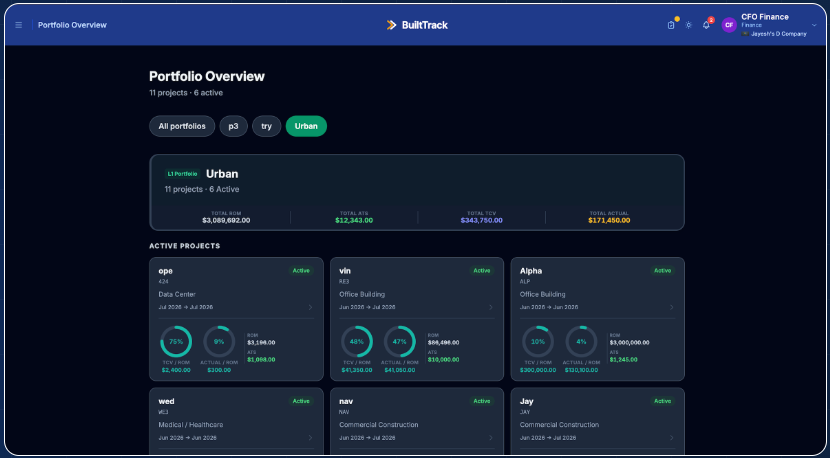
Portfolio Dashboard
Finance gets a consolidated view across all projects. Each project card shows ROM, committed value, contract count, and a health indicator (green / amber / red) based on procurement status. Portfolio-level KPI totals are displayed for Finance.
Relevant roles
Capabilities
- Multi-portfolio, multi-project hierarchy
- Per-project health indicators
- Total ROM, ATS, committed, and actual spend
- Budget utilisation progress bars
- One-click project navigation
Who uses BuiltTrack
Built for every role on the project team.
Role-based access ensures each team member sees and can act on only what is relevant to their responsibilities.
IT Admin
Configures portfolios, manages users, assigns project roles, and administers the company account.
- Company & portfolio management
- User provisioning
- Project creation
- Full analytics access
- Module & permission configuration
CFO / Finance
Reviews ATS submissions, approves bid awards, releases invoice payments, and monitors portfolio financial health.
- ATS approval (full or partial)
- Bid award approval
- Invoice payment release
- Portfolio-level KPI view
- Live EAC/ETC forecast view
Project Lead (PM)
Manages day-to-day project operations — contracts, invoices, PCOs, and team coordination.
- Invoice first-level approval
- Contract management
- PCO & RFI management
- Team assignment
- Risk register ownership
Project Controls
Cost engineers who maintain the WBS, track budget variance, and manage bid packages.
- WBS & budget management
- Bid package management
- Second-level invoice approval
- Analytics reports
- Cost forecasting & risk tracking
Procurement
Manages bid packages, coordinates contractor outreach, reviews bids, and routes awards through the approval chain.
- Bid package creation & management
- Contractor invitation & portal access
- Bid leveling & comparison
- Award approval routing
- Bidding/RFP analytics reports
Contractor
External partner who receives bid invitations, submits proposals, manages their contract, and submits G703 invoices.
- Bid submission portal
- Invoice submission (G703)
- PCO submission
- View own contracts
- Scope of Work (SOW) document access
Why teams choose BuiltTrack
Outcomes your team will notice.
BuiltTrack brings structure to the parts of construction finance that typically live in spreadsheets, email chains, and disconnected tools.
Budget visibility, estimate to payment
Every dollar is tracked from ROM estimate through ATS approval, committed spend, and actual payment — with variance visible at the line-item and project level.
Controlled procurement, RFP to award
Bid packages are scoped to specific WBS rows and approved by the right people before any award is made, preventing unauthorized commitments.
Structured invoice approval, no freelancing
Invoices move through a defined sequence of approvals before payment. Every action — including rejections and comments — is logged with a timestamp.
Change order exposure, tracked in real time
PCOs are logged with their dollar value and schedule impact the moment they're raised, so Finance sees total exposure before any approval is given.
Portfolio health, visible at a glance
The portfolio dashboard aggregates ROM, ATS, committed, and actual spend across every active project, flagging the ones that need attention.
Reports your finance team can act on
Export budget variance, contract summary, and invoice register reports as Excel files or PDFs, filtered by vendor, status, date, and amount.
Cost forecasts that update themselves
Live EAC and ETC are calculated from the same approved budgets, change orders, and invoice payments already in the system — no month-end spreadsheet.
Risk tracked against the budget it threatens
Every risk is tied to the WBS line item and RBS category it affects, scored on a 5×5 matrix, and rolled into dashboards the team actually uses.
Get started
Request a demo.
Tell us about your project environment and team. We'll schedule a walkthrough of BuiltTrack that focuses on the workflows most relevant to your work.
No self-signup
Provisioned after a requirements review.
Fast turnaround
We reply within one business day.
Focused demo
Tailored to your workflows.
Prefer to email directly?
support@innovatemore.dev